Your LinkedIn Personal Profile – Your Digital Business Card
Get a Free Consultation Right NowYour personal profile is your business card, your service website, and a powerful tool for networking and attracting clients. It’s the first thing people see when they get to know you, and it’s exactly where the Cozy Agency team starts when working with clients. Let’s focus on the main points that help you to achieve “All-Star” profile.
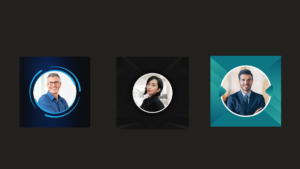
1. Professional Photo
High-quality, professional photo was used to make a strong first impression. Yep, yep! A photo really does set the tone for that first impression. A well-lit, clear headshot with a confident yet approachable expression helps build trust and credibility.
Here are the recommended photo sizes for LinkedIn:
- Recommended size: 400 x 400 pixels.
- Maximum file size: 8 MB.
- Supported formats: JPEG, PNG, or GIF.
2. Background photo
Choose a background photo that reflects your brand. A relevant background image can enhance your profile’s visual appeal and reinforce your professional identity. Remember, the background photo is another opportunity to showcase your services and brand. Consider adding your website, email, and a brief one- to two-sentence description of your services.
Background Banner Photo:
- Recommended size: 1584 x 396 pixels.
- Maximum file size: 8 MB.
- Supported formats: JPEG, PNG, or GIF.
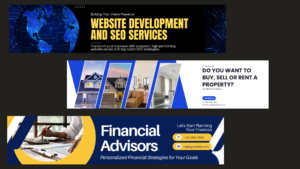
Tip: We recommend using Canva-it’s a fantastic tool with great templates for creating eye-catching LinkedIn photos and banners.
3. Headline
The next impression after your photo is your headline. This is one of the most important elements of your LinkedIn profile. It’s the first thing people see after your photo, and it should clearly reflect who you are, what you do, and how you can add value. Headlines were crafted to reflect each LinkedIn user’s expertise and unique selling proposition. Target headlines can attract potential clients.
A great headline isn’t just your job title – it should highlight your skills, expertise, and professional passion. Think of it as your elevator pitch, right at the top of your profile.
Here are a few tips to make your headline stand out:
- Include keywords that reflect your expertise or the type of work you do.
- Be clear and concise, but don’t be afraid to showcase what makes you unique.
- Consider using symbols or separators to make it visually appealing and easier to read.
For example:
Digital Marketing Specialist | Helping Brands Grow with Data-Driven Strategies | Passionate About Innovation
Real Estate Investment Specialist | Maximizing ROI for Clients | Residential & Commercial Property Investment Strategies
Don’t forget about the link below the headline where you can add your Website, Calendly, and other important links.
4. Detailed Summaries
The “About” section is your story. Use first-person language to share who you are, your experience, achievements, and strengths. Your unique story and experience set you apart.
- What you do and why it matters – Share your expertise and how you help others.
- Your journey and achievements – Highlight key experiences, big wins, and lessons learned.
- Your skills and strengths – What are you really good at? Showcase your top skills.
- Personal touch – Share a bit about your interests or hobbies. Whether it’s yoga, photography, or hiking, these details make you more relatable.
- Call to action – End with an invite to connect: “Let’s exchange ideas, collaborate, or just have a great conversation!
Keep it conversational and authentic – Avoid overly formal language.
Make it easy to read – Use short paragraphs or bullet points.
5. Skills
The Skills section on LinkedIn is a powerful tool for highlighting your expertise and making your profile stand out. Here’s how to make it work:
- Highlight Key Skills: List the skills that are most important for your job and industry.
- Pick Skills that Matter: Choose skills that match your career goals and the people you want to reach.
- Top 3-5 Skills: Focus on your best skills to stand out.
- Get Endorsements: Ask people to endorse your skills to build trust.
- Keep It Fresh: Regularly update your skills to stay current.
This section helps you show your strengths and get noticed by new opportunities!
6. Recommendations
The next very important part is Recommendations. Add client testimonials and endorsements to build credibility. Positive recommendations can increase trust and demonstrate your effectiveness. Frequently ask your previous clients to do this.
Why They Matter: Recommendations provide social proof and demonstrate your effectiveness.
How to Get Them: Ask clients, colleagues, or managers for recommendations, and guide them on key achievements or skills to highlight.
Ask Often: Regularly request recommendations to keep your profile strong and trustworthy.
7. Featured
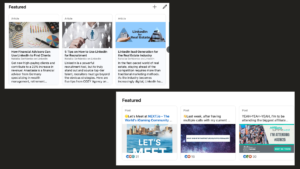
Our Favorite Section – Featured Section. Use the ‘Featured’ section to showcase your most impactful content.
Why It Matters: It gives your profile a more dynamic and engaging look, making it stand out.
What to Include: Add media that best represents your work, success stories, or skills that align with your career goals. This section helps highlight your value and makes your profile more appealing to anyone browsing.
Conclusion
Think of your LinkedIn profile as your digital business card, ready to make a lasting impression. From a standout photo to a killer headline, and an engaging summary – every section matters in creating a profile that captures attention.
Highlight your skills, add meaningful recommendations, and feature your best work to truly show off what you bring to the table. With the right tweaks, your profile becomes a powerful tool for connecting, networking, and lead generation.
Hope these tips help in optimizing your LinkedIn profile to reach that ‘All-Star’ status.
Ready to take your profile to the next level and attract more opportunities?
Let’s connect! Cozy Agency can help you stand out, grow your personal brand, and generate valuable leads.